


Navigate360 Student
3.7392.00 Reviews
App Specs
- Version
- 26.17.8
- Updated On
- License
- Free
- Downloads
- 500,000+
- Developer
- EAB Global
- Categories
- Education
- Platform
- Android
Screenshots
 Analysis by AppCompare
Ever tried juggling a dozen tasks at school and felt like you might drop a few? I’ve been there, and that’s why I decided to check out Navigate360 Student. This app promises to be your personal school assistant, and I was curious to see if it lived up to the hype.
My overall take is that Navigate360 Student makes the most sense when a student’s school uses it as part of campus life, rather than as a stand-alone replacement for every planner and support service. Its appeal is the mix of practical student guidance and attention to safety and well-being. That combination can be useful, but it also means the experience depends heavily on whether the information and services offered match what you need at your institution.
It is a free education app from EAB Global, with an Everyone age rating. It has a 3.5 average from around 1,000 ratings and has passed half a million installs. Those figures suggest a sizeable audience, but I would treat them as context, not proof that it will suit every college: a campus-specific app can feel very different depending on how well your school has put it into use.
First Impressions
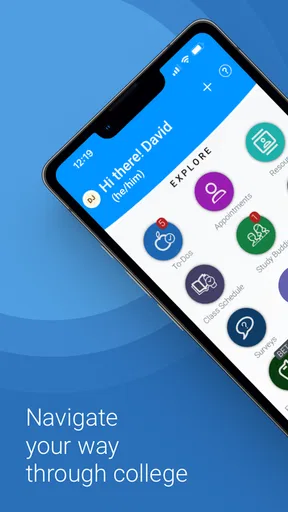
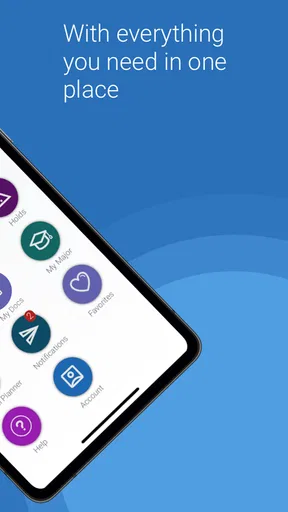
When I first downloaded Navigate360 Student, I was immediately drawn to its clean and user-friendly interface. It’s like whoever designed it knew exactly what students need: simplicity, efficiency, and a bit of style. The dashboard is intuitive, making it super easy to navigate through the different features without feeling overwhelmed.
Setting it up was a breeze. All I needed to do was enter my school info and schedule, and voilà, everything was laid out perfectly. The app even customized my dashboard based on my preferences. Talk about a personal touch!
That said, I would think of the first setup as the start of a campus-specific check, not a guarantee that every school works identically. A sensible first step is to confirm that your institution is available and that the information shown is current before building your routine around it. If you do not see the parts of the campus experience you expected, it is worth asking your school which services it supports through the app rather than assuming the app itself has failed.
Features That Stand Out
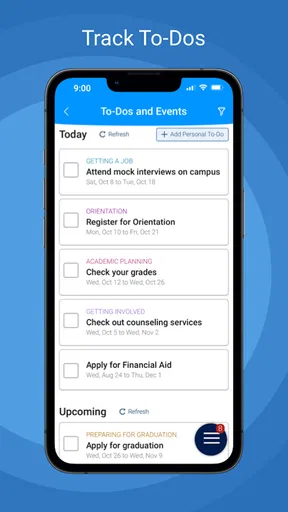
One of the key features I found incredibly useful is the integrated calendar. It syncs seamlessly with my existing calendar apps, ensuring I never miss an assignment deadline or a class. I could easily add events, set reminders, and even color-code tasks based on priority. This feature alone has saved me from the dreaded late-night "oh no, I forgot about that assignment!" panic.
Worth Reading Before You Choose

EA SPORTS FC Mobile 26 Is a Bigger Football Game, but It Takes Time

Flipboard Shows What News Apps Must Do Beyond the Feed

Switching to Android Auto Means Rethinking Your Driving Routine

Google Calendar Makes a Crowded Week Easier to Manage

Ludo King Makes the Most of the Minutes Between Plans

Baby Panda World Brings Quick Play to Modern Phones, but Its Game Library Feels Busy
For a more dependable routine, I would avoid making two calendars compete. Decide which one is your main record, then use the other to surface the events you genuinely need to see. A weekly check is also useful: compare upcoming classes and deadlines with your course pages, especially after a timetable change. The app can help bring commitments together, but it cannot replace checking whether a lecturer or department has changed an assignment date.
Another great feature is the study planner. It helps break down my study sessions into manageable chunks, making it easier to focus and absorb information. Plus, the app offers personalized tips and study hacks based on my subjects. It’s like having a little study buddy in my pocket!
I found planning most useful when I started with a specific task instead of a vague goal such as “study biology.” Splitting work into steps—reviewing a lecture, making notes, then testing myself—makes a study session easier to begin and easier to judge afterward. The trade-off is that a planner cannot decide what matters most in a course; I still need to use the syllabus and my own understanding to choose the right task. Students who already plan comfortably in a notebook may not gain much by moving that habit into another app.
In everyday use, I can picture opening the app between classes to check what is coming up, then using a quiet hour later to turn a large assignment into smaller study blocks. That kind of short check-in is more realistic than expecting an app to manage an entire semester on its own. I would keep the habit lightweight: review the next few days, make one or two useful adjustments, and then get back to the work rather than spending time perfecting a schedule.
Safety and Well-being
What really sets this app apart from others is its focus on student safety and well-being. Navigate360 Student includes a feature for reporting any safety concerns directly to school authorities. It’s discreet and ensures that students can communicate issues without fear. I think this is a brilliant addition, especially in today’s world.
A reporting option can lower the effort involved in raising a concern, but it should not be mistaken for an emergency service. If someone faces immediate danger, they should contact local emergency services or campus responders through the channels their school identifies. For a non-urgent concern, it is sensible to be clear and factual in a report, then use the school’s established follow-up route if a response is needed. That distinction matters because an app can make communication easier without guaranteeing how quickly a campus will act.
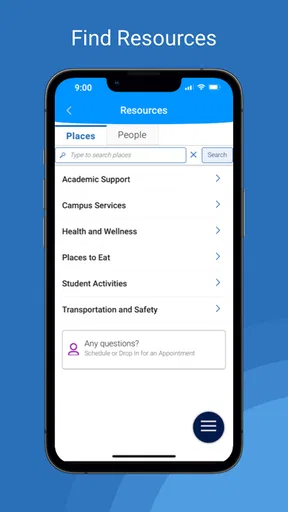
The app also provides resources for mental health and wellness. From meditation guides to stress management tips, it’s packed with tools that help students maintain a healthy balance. I found myself using these resources more than I expected, and they genuinely helped me through some stressful weeks.
I see those resources as a useful first step, not a substitute for personal care or professional support. A short exercise or practical tip may help someone pause during a demanding day; ongoing distress calls for reaching out to a trusted person or a qualified campus service. Students should also feel free to ignore any resource that does not suit them. Well-being tools are most valuable when they feel supportive rather than like another task to complete.
Room for Improvement?
While Navigate360 Student is packed with great features, there’s always room for improvement. I noticed that the app doesn’t currently support offline access to some features, which can be a bit of a downside when Wi-Fi is spotty. Also, while the app is mostly intuitive, a few additional tutorials could help new users get the hang of all the features faster.
That connectivity limitation changes how I would rely on it. I would check important information before heading somewhere with unreliable reception and keep essential details available through a backup method when needed. For students who commute through low-signal areas or study in places with weak Wi-Fi, a paper note or their usual offline calendar may be the safer option for time-critical plans. The app is more comfortable as a connected companion than as the only place to store information that must always be accessible.
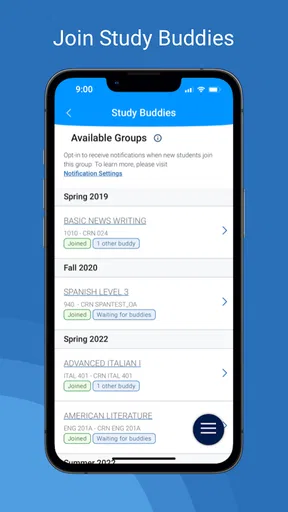
Another thing that might be a nice touch is integrating more collaborative tools. Study groups are a big part of student life, and having a built-in feature for group chats or shared projects would enhance the app’s functionality even more.
That makes it different from a dedicated messaging or collaboration app: I would use Navigate360 Student for individual campus organization and support, not assume it can coordinate a whole group’s work. For shared deadlines, classmates may still need a group chat or a collaborative document, while each person keeps their own schedule in order. Students who mainly want team project management, chat, or a comprehensive assignment tracker may be better served by tools built specifically for those jobs.
Another practical question is whether it replaces a college’s other systems. I would not assume that it does. Course materials, official notices, and assignment submissions may still live in separate campus or classroom services, so it is worth checking where each kind of information comes from before relying on the app alone. Keeping the roles clear prevents missed work: use the appropriate official source for course requirements, and use this app where it adds a helpful view of student life.
Who It Suits Best
I would recommend trying it if you are a college student whose institution supports it and you want a single place to check relevant campus guidance alongside personal organization and well-being resources. It is especially promising for someone who is adjusting to college routines, tends to lose track of small commitments, or wants an approachable way to find a route for raising a campus concern.
It is less compelling for students who already have a reliable planning system and only need a powerful calendar, detailed task management, or group collaboration. In those cases, a dedicated calendar or project tool may be more direct, and a school’s own official channels may be better for urgent notices. I would also hesitate to recommend depending on it as the sole source of time-sensitive information when connectivity is unreliable.
Before making it part of your routine, I would take a few minutes to check what your school has made available, confirm that key details look current, and decide which app or site remains the official source for class changes. That small test tells you whether it fits your campus and avoids the frustration of building a workflow around information you still need to find elsewhere.
Final Thoughts
Overall, Navigate360 Student is a fantastic tool for any student looking to streamline their school life and focus on what truly matters. The app’s blend of practicality and emphasis on safety and mental health makes it stand out in a crowded market. It’s not just about getting things done, but about doing them in a way that’s healthy and sustainable.
If you’re a student looking to get organized, stay safe, and maybe even find some peace of mind along the way, I’d definitely recommend giving Navigate360 Student a try. It’s like having a personal assistant who gets exactly what you need. And honestly, who wouldn’t want that?
My recommendation comes with one qualification: treat it as a useful campus companion, not a universal control panel for college. The current version, 26.10.5, is free to try, so the practical test is whether your school’s setup makes the calendar, guidance, and support resources relevant to your day. If it does, a few brief check-ins can make it easier to stay oriented without adding much friction. If it does not, there is no reason to force it into a routine that already works.
Pros
- User-friendly interface for easy navigation.
- Comprehensive safety resources included.
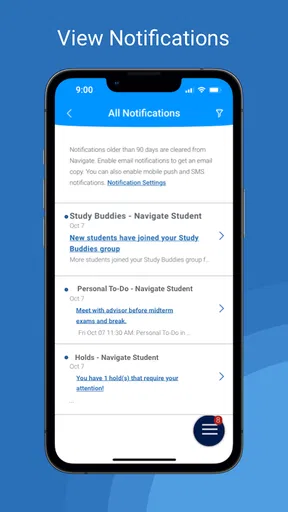
- Real-time alerts for quick updates.
- Customizable settings for tailored experience.
- Secure data handling ensures privacy.
Cons
- Limited offline functionality options.
- Some features require paid subscription.
- Occasional lag in notification delivery.
- Interface may feel cluttered on small screens.
- Initial setup can be time-consuming.
FAQs for Navigate360 Student
What is Navigate360 Student and how does it enhance student safety?
Navigate360 Student is an app designed to enhance school safety and student well-being. It provides tools for real-time communication, anonymous reporting, and access to mental health resources. The app integrates with school systems to ensure a comprehensive safety solution, offering features like emergency alerts, bullying prevention, and threat assessment capabilities.
How does the anonymous reporting feature work in Navigate360 Student?
The anonymous reporting feature allows students to report concerns such as bullying, threats, or mental health issues without revealing their identity. This encourages more students to speak up about safety concerns. Reports are forwarded to designated school administrators who can assess and address the situation promptly, ensuring student confidentiality and timely interventions.
Is Navigate360 Student compatible with both Android and iOS devices?
Yes, Navigate360 Student is available for both Android and iOS platforms. Users can download the app from Google Play Store or Apple App Store. It ensures accessibility across different devices, allowing students and educators to use the app's features seamlessly, regardless of their preferred mobile operating system.
What measures are in place to protect user data and privacy on Navigate360 Student?
Navigate360 Student prioritizes user privacy and data protection by implementing robust security measures. The app complies with data protection regulations and uses encryption to secure communications. User data is stored securely and only accessible to authorized personnel, ensuring that students' personal information and reports remain confidential.
Can parents access Navigate360 Student, and what involvement do they have?
Parents can engage with Navigate360 Student through features that allow them to receive notifications and updates on school safety. While the app is primarily designed for students and school staff, parents benefit from increased transparency and communication regarding their child's safety and well-being, supporting a collaborative approach to school safety.


